CRM for Small Business: Benefits, Features, and How to Choose the Right Software
By WIngmate
3 Views
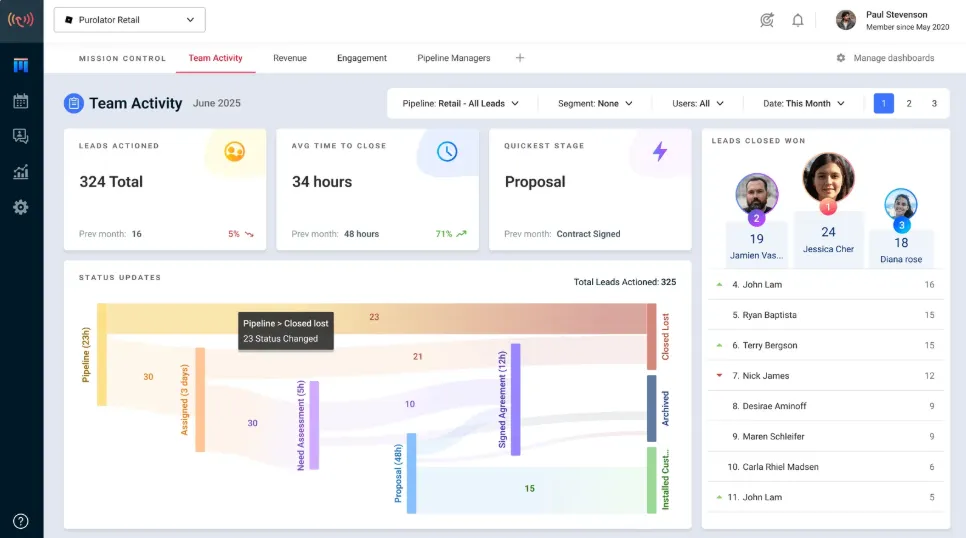
Customer relationships play a significant role in the growth of every small business. As companies attract more customers, manage increasing inquiries, and handle multiple sales opportunities, keeping track of interactions can become difficult. Spreadsheets, scattered emails, and manual notes may work initially, but they often become inefficient as the business expands.
CRM for small business provides a centralized way to manage customer information, organize sales activities, improve communication, and build stronger customer relationships. With the right system, small businesses can reduce administrative work, identify sales opportunities, and deliver more consistent customer experiences.
Choosing suitable CRM software requires an understanding of business goals, essential features, budget, and future growth plans. This guide explains how CRM works, why it matters, and how small businesses can implement it effectively.
What Is CRM for Small Business?
CRM stands for Customer Relationship Management. It refers to the strategies, processes, and software businesses use to manage relationships with existing customers and potential buyers.
A small business CRM system stores important information in one place, including contact details, communication history, sales opportunities, customer preferences, and follow-up activities.
Instead of searching through multiple spreadsheets or email conversations, employees can access relevant customer information through a centralized platform.
How CRM Software Works
CRM software organizes customer information and helps employees manage each stage of the customer journey, from the first inquiry to repeat purchases.
For example, a small consulting firm may use CRM software to record a prospective client's inquiry, schedule a discovery meeting, send a proposal, and track the final decision.
Typical CRM activities include:
- Storing customer and prospect information.
- Recording calls, emails, meetings, and other interactions.
- Tracking sales opportunities through different stages.
- Scheduling reminders and follow-up tasks.
- Monitoring sales performance and customer engagement.
- Organizing customer support requests.
- Generating reports to support business decisions.
The primary purpose of CRM is to make customer information easier to manage and turn it into better business relationships and more effective sales activities.
Who Needs a Small Business CRM?
CRM software can benefit businesses across many industries, including:
- Retail businesses managing repeat customers.
- Service providers tracking inquiries and appointments.
- Startups organizing leads and early sales opportunities.
- B2B companies managing longer sales cycles.
- E-commerce businesses coordinating customer communication.
- Agencies handling multiple client accounts.
- Field sales teams managing customer visits and follow-ups.
The most suitable CRM depends on the business model, the complexity of customer relationships, and the amount of information the team needs to manage.
Why Do Small Businesses Need CRM Software?
Small businesses often operate with limited budgets and small teams. Every missed inquiry, forgotten follow-up, or poorly managed customer interaction can affect revenue and customer satisfaction.
A CRM system provides structure without requiring a business to build complicated processes from scratch.
Better Customer Organization
As a customer base grows, maintaining accurate records becomes increasingly important. CRM software consolidates contact information, purchasing history, communication records, and relevant notes.
This makes it easier for employees to understand customer needs and continue conversations without repeatedly requesting the same information.
Improved Sales Management
CRM software helps businesses track opportunities from initial contact to a completed sale. Managers can see which deals require attention, which prospects need follow-up, and where potential customers are leaving the sales process.
This visibility supports more organized selling and more informed sales forecasts.
More Consistent Follow-Ups
Delayed responses can cause businesses to lose potential customers. CRM reminders and task management features help employees follow up at the appropriate time.
For example, a representative can schedule a reminder to contact a prospect three days after sending a quotation.
Stronger Customer Relationships
Access to customer history allows businesses to personalize conversations and respond more effectively to individual needs.
When customers receive relevant communication and consistent service, businesses are better positioned to earn trust, encourage repeat purchases, and strengthen long-term relationships.
Key Features to Look for in CRM Software
Not every small business needs an advanced CRM platform. The best solution provides the essential tools required to manage customers efficiently without introducing unnecessary complexity.
Contact and Lead Management
Contact management allows businesses to store customer details, communication history, preferences, and account information in organized records.
Lead management helps teams track potential customers, assign responsibility, and identify which prospects are most likely to become paying customers.
Sales Pipeline Management
A sales pipeline shows where each opportunity stands in the sales process. Common stages include new lead, qualified prospect, proposal sent, negotiation, and closed deal.
This visibility helps employees prioritize opportunities and allows managers to identify deals that require additional attention.
Workflow Automation
Automation reduces repetitive administrative tasks, such as creating reminders, assigning leads, updating opportunity stages, and sending routine notifications.
Small businesses should begin with simple workflows and expand automation only when it addresses a clear operational need.
Reporting and Analytics
Reporting features help business owners understand sales trends, conversion rates, customer acquisition, and team performance.
These insights can support better decisions about marketing investments, sales priorities, and resource allocation.
Mobile Access and Integrations
A mobile-friendly CRM enables employees to update customer records and review sales opportunities while traveling or attending meetings.
Integrations with email, calendars, accounting systems, and other business applications can reduce duplicate data entry and improve coordination.
Types of CRM Systems for Small Businesses
CRM software can be categorized by its primary purpose. Understanding these categories helps businesses choose a system that matches their objectives.
CRM type Primary purpose Best suited for
Operational CRM Automating sales, marketing, and service activities Businesses seeking efficiency
Analytical CRM Analyzing customer data and performance trends Businesses making data-driven decisions
Collaborative CRM Sharing customer information across teams Businesses with multiple customer-facing departments
Some CRM platforms combine all three approaches. A small business may benefit from an operational CRM initially and adopt more advanced analytics as its customer base expands.
How to Choose the Best CRM for a Small Business
Selecting the right CRM requires more than comparing feature lists. The system should solve existing problems, fit the available budget, and remain practical for employees to use consistently.
Identify Business Requirements
Before evaluating software, businesses should identify their most important challenges. These may include losing track of leads, missing follow-ups, managing customer support, or generating accurate sales reports.
A clear list of priorities helps prevent businesses from paying for features they do not need.
Compare Pricing and Total Costs
CRM pricing may depend on the number of users, available features, automation limits, data storage, and subscription tier.
Businesses should also consider onboarding, training, integrations, and potential migration expenses when estimating the total cost.
Evaluate Ease of Use
A complicated system may create resistance among employees and reduce adoption. A suitable CRM should make common tasks easy to complete, including adding contacts, updating opportunities, and scheduling follow-ups.
A trial or demonstration can help the team assess whether the interface fits its daily workflow.
Check Security and Scalability
Businesses should review access controls, authentication options, data export capabilities, backup policies, and the provider's security documentation.
The platform should also accommodate future growth without forcing an immediate migration to another system.
The best CRM is not necessarily the one with the most features. It is the one that meets business requirements, fits the budget, protects customer information, and supports consistent adoption.
Free vs. Paid CRM Software
Free CRM software can be an effective starting point for startups and small businesses with limited budgets. Paid plans may become valuable when a business requires more advanced automation, reporting, permissions, or customer support.
Factor Free CRM Paid CRM
Initial cost Usually no subscription fee Recurring subscription
Core contact management Often available Generally available
Automation May be limited Often offers more advanced options
Reporting Basic features may be included More customization may be available
Support May be limited to self-service resources Additional support options may be available
Scalability Depends on plan limitations Often offers additional capacity and features
The exact features and limitations vary by provider and subscription. For example, HubSpot offers a free CRM option, while Salesforce CRM provides packages designed for smaller businesses.
Businesses should compare current plan details before choosing a platform rather than assuming that every free plan includes the same capabilities.
Best Practices for CRM Implementation
Successful implementation depends on how well the CRM fits existing business processes and how consistently employees use it.
Start With Clean Customer Data
Before importing information, remove duplicate contacts, correct inaccurate records, and establish consistent data-entry rules.
Organized information makes reporting more reliable and helps employees trust the system.
Train Employees on Everyday Tasks
Training should demonstrate how to add contacts, update deals, record interactions, and complete follow-up activities.
Short practical sessions and written instructions can help employees develop consistent habits.
Establish Clear Usage Rules
Businesses should define which information must be recorded, who owns each customer relationship, and when records should be updated.
These rules reduce inconsistent reporting and help prevent customer interactions from being overlooked.
Review Performance Regularly
Managers should review CRM adoption, data quality, sales pipeline health, and business outcomes. Improvements can then be introduced gradually based on actual usage.
A structured implementation process should also account for integrations, migration requirements, and testing before major changes are introduced.
Common CRM Mistakes to Avoid
Small businesses can reduce implementation problems by avoiding several common mistakes:
- Choosing software based only on price: A low-cost tool may lack important capabilities or become expensive as usage grows.
- Overcomplicating the system: Too many fields and workflows can discourage employees from using the CRM.
- Ignoring employee training: Employees need to understand how the system improves their work.
- Neglecting data quality: Duplicate or outdated records undermine reporting and customer communication.
- Failing to measure results: Without clear goals, it becomes difficult to determine whether the CRM is providing value.
A simple, well-maintained CRM is often more useful than a sophisticated platform that employees rarely update.
Frequently Asked Questions About CRM for Small Business
Is CRM software worth it for a small business?
CRM software can be worthwhile when a business needs to manage multiple customers, track sales opportunities, or improve follow-up consistency. The value depends on whether the system solves genuine problems and whether employees use it regularly.
Can a small business use a free CRM?
Yes. Many small businesses can begin with a free CRM that supports contact management and basic sales tracking. Before committing, they should review user limits, storage restrictions, integrations, and upgrade costs.
How much does CRM software cost?
Costs vary by provider, plan, and number of users. Some CRM systems offer free plans, while paid subscriptions may charge per user or provide bundled packages. Businesses should check current pricing and calculate the total cost for their expected usage.
How long does CRM implementation take?
A basic setup may take only a short time, while implementations involving complex data migration, integrations, and customized workflows can take considerably longer. The timeline depends on the quality of existing data, business requirements, and employee training.
Can CRM software help increase sales?
CRM software can support sales growth by organizing leads, improving follow-ups, tracking opportunities, and identifying bottlenecks. However, results also depend on product quality, market demand, sales skills, and the effectiveness of the business's overall strategy.
Conclusion
CRM for small business provides a practical way to organize customer information, manage sales activities, improve communication, and support sustainable growth. By centralizing records and creating consistent processes, businesses can spend less time managing scattered information and more time serving customers.
The most effective approach is to identify essential requirements, compare suitable free and paid options, prepare accurate customer data, and train employees before expanding into advanced features.